
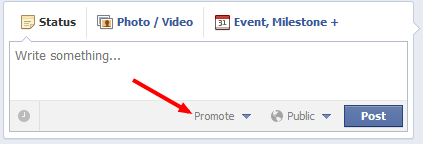
 Facebook recently made it possible for pages to promote page posts for a fee. This feature allows pages to do a pay-per-impresson (PPM) campaign for their Facebook posts. Before this option was available, company pages were subject to Facebook’s EdgeRank algorithm and could not control nor guarantee how many eyes saw their post. Promoting a Facebook post is similar to paying for an email blast or banner ads, but it differs because you cannot capture any specific demographic information of those who see your post (name, contact info, etc).
So when would a marketer use a post promotion? It is ideal for a variety of reasons and some examples may be that a company needs to drive registrations to an event or webinar, or a company is promoting a sale or event and it desperately wants eyes to see the status/photo/video. The following steps will help guide you through a Facebook post promotion.
A – Cost/Reach
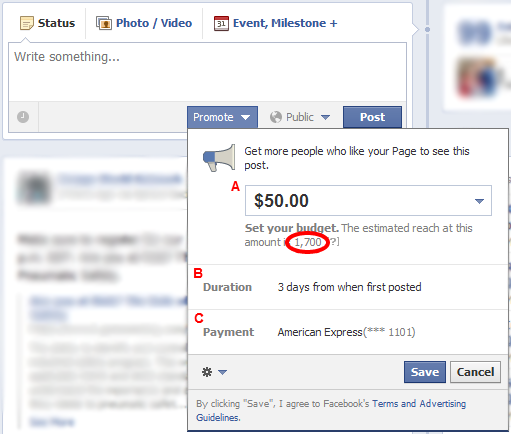 First, you need to set the budget for your post. The limit for how much you can spend will depend on how many fans your page has. If your page has more fans, it will cost you additional advertising dollars from your marketing budget to guarantee a larger audience reach. In this example to the right, you can see that $50 for this page will reach an estimated 1,700 of its 25,000 fans. If you post to your Facebook page from a 3rd party app (Sprout Social, Hootsuite, Tweetdeck, etc), you will not be able to promote these posts. Note: if you manage multiple pages, the price differs for each page in terms of how much reach (impressions) a post will have for a given amount of money.
B – Duration
Facebook post promotions will run until either 1) the budget is used up, or 2) for three days. Note: If you want to promote a past post, you are able to do so only if it is not older than three days. Also, the same rule applies here for past posts made by 3rd party apps; you will not be able to promote said posts.
C – Payment
Select your method of payment. Note: If you have already run Facebook ads, it will automatically pull the same credit card that you used for those.
It is as simple as that, good luck and don’t forget to share your success and/or horror stories with Facebook post promotions!
-Lance Brown